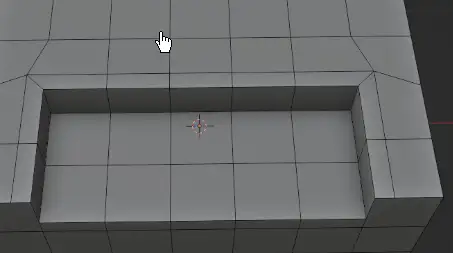
Slide Edge is a edge-sliding tool designed for duplicate and slide the selected edges.
It is very useful for retopology works and general modeling.
This tool is designed for topology works. You can slide the edges to inner or outer direction. The nearby edges of connected poles will be slide too.
You can also select boundary edges to slide.
You can also select edges from multiple locations to slide together.
This tool is designed for core modeling work. Hope you enjoy it !
Updates
Version 1.6.0
Fixed compatibility problem
Version 1.5.0
Updated to work with Blender 4.0.0
Version 1.4.0
Since Blender 3.5.0, the use of OpenGL is deprecated and show warning about it. This update switch to blender’s new GPU function. (however the function has problem for line smoothing)
Version 1.3.0
Fixed the shading problem when sliding edges.
Version 1.2.5
Now you can slide across the screen infinitely. When you hold Shift-key for slow sliding, it is more convenient now!
Version 1.2.3, 1.2.4
Fixed a bug for handling invalid selection
Version 1.2.2
Improve mouse control for sliding. Now it is sliding with same direction of cursor movement !
Version 1.2.1
Now you can hold Shift key to move the edge slowly !
Added an option for selecting original edges (and result edges too)
Version 1.2.0
This is a major update!
Now you can slide the edge by mouse movement. (note: move the cursor horizontally)
Fixed some sliding bugs and improved quality.
Version 1.1.1
Now the sliding does not exceed the face area
Version 1.1.0
Fixed a bug for handling flat plane
Version 1.0.0
initial release
Usage
Switch to blender edit mode > edge mode
Select your edges
Right click on the 3d viewport (context menu pop up)
Select Slide Edge from the bottom of menu
You can adjust the sliding distance (moving mouse cursor left and right)
You can hold Shift key to adjust slowly
Left click mouse to confirm
You can change the setting at the Left-bottom menu too
Slide Edge is a edge-sliding tool designed for duplicate and slide the selected edges.
It is very useful for retopology works and general modeling.
This tool is designed for topology works. You can slide the edges to inner or outer direction. The nearby edges of connected poles will be slide too.
You can also select boundary edges to slide.
You can also select edges from multiple locations to slide together.
This tool is designed for core modeling work. Hope you enjoy it !
Updates
Version 1.3.0
Fixed the shading problem when sliding edges.
Version 1.2.5
Now you can slide across the screen infinitely. When you hold Shift-key for slow sliding, it is more convenient now!
Version 1.2.3, 1.2.4
Fixed a bug for handling invalid selection
Version 1.2.2
Improve mouse control for sliding. Now it is sliding with same direction of cursor movement !
Version 1.2.1
Now you can hold Shift key to move the edge slowly !
Added an option for selecting original edges (and result edges too)
Version 1.2.0
This is a major update!
Now you can slide the edge by mouse movement. (note: move the cursor horizontally)
Fixed some sliding bugs and improved quality.
Version 1.1.1
Now the sliding does not exceed the face area
Version 1.1.0
Fixed a bug for handling flat plane
Version 1.0.0
initial release
Usage
Switch to blender edit mode > edge mode
Select your edges
Right click on the 3d viewport (context menu pop up)
Select Slide Edge from the bottom of menu
You can adjust the sliding distance (moving mouse cursor left and right)
You can hold Shift key to adjust slowly
Left click mouse to confirm
You can change the setting at the Left-bottom menu too
Downloads: show love to dev by purchasing if you can afford it
IF THE LINKS ARENT WORKING, THEN PLEASE ACT LIKE A GROWN UP AND MESSAGE ME/ COMMENT HERE OR ON DISCORD AND I WILL UPDATE THESE LINKS QUICKLY! MAKE SURE YOU DOWNLOADING PROPER FILE WITH PROPER EXTENSION LIKE .ZIP OR .RAR
Filename: slide_edge 1.6.0 vfxMed.zip [42 KB]
Official Discord : https://discord.gg/M2kqB4M9tG
USE IDM FOR FASTER DOWNLOAD.
https://send.now/n9hbi4ce3i59
USE ANY FREE VPN IF U CANT DOWNLOAD THE FILE OR GET AN ERROR LIKE INTERNAL SERVER 500 ERROR!
ONLY USE BRAVE BROWSER TO DOWNLOAD WITHOUT ADS AND QUICKLY! GUYS MAKE SURE TO AVOID ADS!! DONT DOWNLOAD ADS, KEEP AN EYE ON SPAMMY WEBSITES THAT WILL OPEN WHEN YOU CLICK ON DOWNLOAD LINK!
MIRRORS:
for mega and g drive links – contact admin.